
fetch returns a promise. either pending or with data
Follow this url to get detailed concept.
fetch function takes a mandatory single arrangement as URL.
fetch -> return promise -> promise will be either a success or failure.
In case of success -> call .then(with call back function) method.
In case of failure -> call .catch(with call back function) method
Now one major thing.
Fetch always does not return whole data when we call a valid URL.
For example, for API call: https://jsonplaceholder.typicode.com/todos/1 We must see JSON as a response. like
{
  "userId": 1,
  "id": 1,
  "title": "delectus aut autem",
  "completed": false
}But when we run the following code in js file:
let url = "https://jsonplaceholder.typicode.com/todos/1";
fetch(url)
  .then((data) => {
    console.log(data);
  })
.catch(() => {});gives this as output in the console.
Response {type: 'cors', url: 'https://jsonplaceholder.typicode.com/todos/1', redirected: false, status: 200,ok: true, …}body: (...)bodyUsed: falseheaders: Headers {}ok: trueredirected: falsestatus: 200statusText: ""type: "cors"url: "https://jsonplaceholder.typicode.com/todos/1"[[Prototype]]: ResponseWe are expecting JSON but it gives only header & status code etc. WHY? WHY??
Because:
It is so expensive to pass the entire response body and pass immediately to the browser for fetch API. Because sometimes as a developer you may not want entire data at one time! So fetch API gives option to the developer how to handle the data.
When dealing with the response of ajax we use json() method. Don’t confuse between json() and JSON as a javascript object.
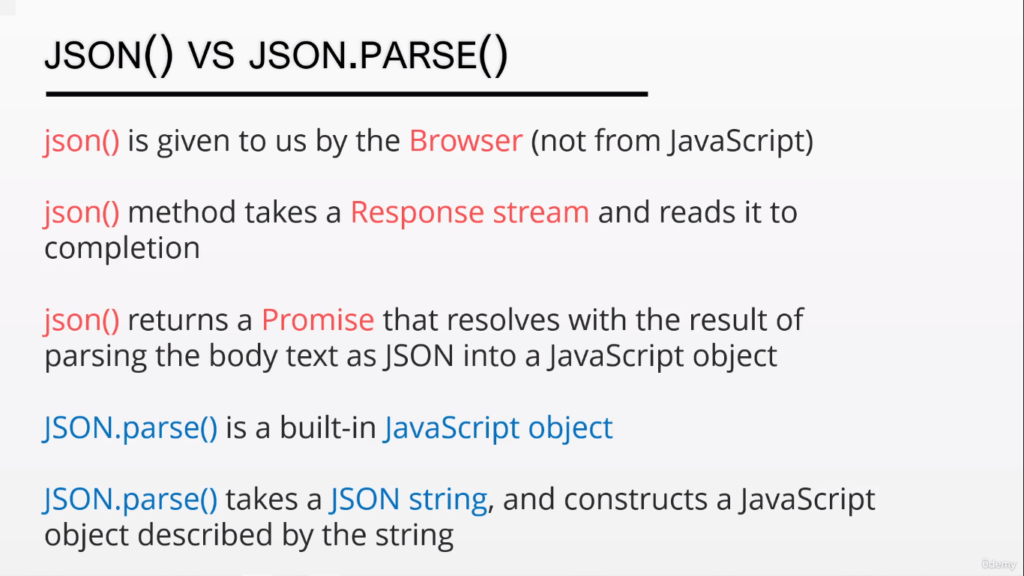
Now JSON return type is also promise so we need another .then() method to read its value.
Remember: When using fetch, you need to use a double promise to actually get the data. The first promise gets the response and the second one takes the response and converts it into JSON.
So final code is :
let url = "https://jsonplaceholder.typicode.com/todos/1";
fetch(url)
  .then((response) => {
    //   console.log(response.json());
    return response.json();
  })
  .then((finalresponseinjson) => {
    console.log(finalresponseinjson);
  });
// .catch(() => {});Gives output
{userId: 1, id: 1, title: 'delectus aut autem', completed: false}How Fetch Works with a Promise (Explained Simply)
Imagine you’re ordering a pizza from a pizza shop. When you ask for the pizza, the pizza shop promises to either deliver it (successful) or tell you there’s a problem (failure). But you don’t know exactly when the pizza will arrive, so you have to wait for the promise to be kept.
What Happens When You Use Fetch?
- Fetching the Pizza: When you order the pizza (use
fetch()), the shop doesn’t immediately give you the pizza. Instead, they give you a pizza box (called the “Response”). This box doesn’t have your pizza yet—it just tells you whether your order went well or if there was an issue. - The Promise: The shop gives you a promise: “We’ll either give you the pizza (data) or tell you there’s a problem (error).”
- When the Pizza is Ready (Success): Once the pizza is ready, you can use
.then()to open the box and get your pizza (data).- If everything goes well, the pizza shop fulfills their promise, and you get the pizza you ordered.
- If Something Goes Wrong (Failure): If something goes wrong, like the pizza shop runs out of ingredients, the promise is rejected. You can use
.catch()to handle the problem (like getting a refund or choosing a new pizza).
The Two Steps of Fetching
When you use fetch() to get data from the internet, there are two steps:
- First Promise: When you use
fetch(), you get a pizza box (the response). But it doesn’t have the actual pizza yet. It just tells you if everything is okay or if there’s a problem. - Second Promise: To get the actual pizza (data), you need to open the box using the
.json()method. But, wait!.json()is also a promise! That means you need another.then()to actually get the pizza inside the box (the real data).
Final Example
Here’s how you would order a pizza and open the box (get the data):
let url = "https://jsonplaceholder.typicode.com/todos/1";
fetch(url)  // Order the pizza
  .then((response) => {
    return response.json();  // Open the box to get the pizza
  })
  .then((pizzaData) => {
    console.log(pizzaData);  // Enjoy your pizza (data)!
  });
Remember:
fetch()gets you the pizza box (the response)..json()opens the box to get the pizza (the data).- You need two promises to get your pizza, one for the box and one for the pizza inside!