
Here is the overall idea how we work with illuminate packages to create custom MVC.
We have a git repo which is working fine with all illuminate packages to shape a custom MVC.
Now check index file. It is having some code which you need to remember all the time so you can remember overall concept easily.
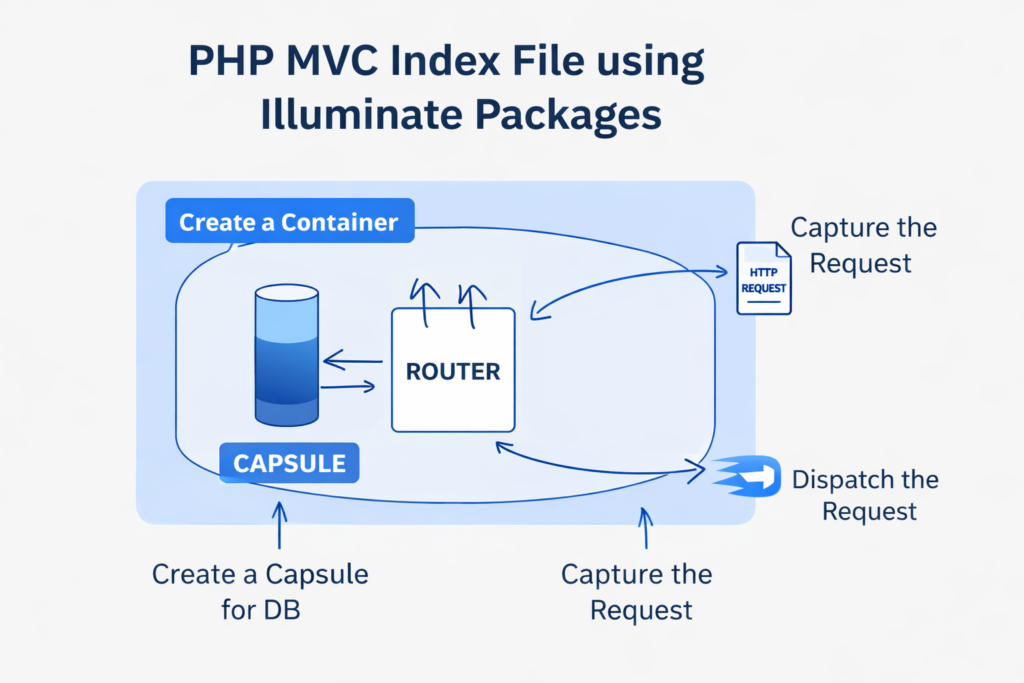
This mental model is exactly how Laravel itself boots, so remembering it this way will really help you as you build your own MVC system with Illuminate.
Below is a clean, memorable explanation + method usage, mapped 1-to-1 with your diagram.
🧠 Mental Model (One-Line Memory Trick)
Container holds everything → Capsule gives DB → Router decides → Request comes in → Dispatcher sends it to action
Or shorter:
Container → Capsule → Router → Request → Dispatch
🔹 1. Create the Container
“The brain of the application”
The Container is a Dependency Injection (DI) box.
Everything (DB, Router, Controllers) lives inside it.
Why it matters
- Automatically resolves dependencies
- Allows loose coupling
- Same concept used in Laravel
Code
use Illuminate\Container\Container;

$container = new Container();
Think of it as
🧺 A box that stores and resolves objects when needed
🔹 2. Create a Capsule (Database Layer)
“Database lives inside the container”
Capsule is a lightweight Eloquent ORM wrapper.
Responsibilities
- Configure DB
- Boot Eloquent
- Register DB inside container
Code
use Illuminate\Database\Capsule\Manager as Capsule;

$capsule = new Capsule($container);

$capsule->addConnection([
    'driver'    => 'mysql',
    'host'      => '127.0.0.1',
    'database'  => 'test',
    'username'  => 'root',
    'password'  => '',
    'charset'   => 'utf8',
    'collation' => 'utf8_unicode_ci',
    'prefix'    => '',
]);

$capsule->setAsGlobal();
$capsule->bootEloquent();
Think of it as
🧴 A capsule that injects DB power into your app
🔹 3. Create the Router
“Traffic controller of requests”
Router decides:
- Which URL
- Which HTTP method
- Which controller method
Code
use Illuminate\Routing\Router;
use Illuminate\Events\Dispatcher;

$router = new Router(new Dispatcher($container), $container);
Define routes
$router->get('/', function () {
    return 'Home Page';
});

$router->get('/users', 'UserController@index');
Think of it as
🚦 A router that decides where the request should go
🔹 4. Capture the Request
“Catch the incoming HTTP request”
Illuminate captures:
- URL
- Method (GET/POST)
- Headers
- Input data
Code
use Illuminate\Http\Request;

$request = Request::capture();
Think of it as
📩 Receiving a letter from the browser
🔹 5. Dispatch the Request
“Execute the matched route”
This is where:
- Router matches the route
- Controller method is executed
- Response is returned
Code
$response = $router->dispatch($request);
$response->send();
Think of it as
🚀 Sending the request to the correct destination
🔁 Full Flow (Index.php in Order)
require 'vendor/autoload.php';
// 1. Container
$container = new Illuminate\Container\Container();
// 1.2. Bind Controller
$container->bind('UserController', function ($container) {
return new UserController();
});
// 2. Capsule (DB)
$capsule = new Illuminate\Database\Capsule\Manager($container);
// DB config here...
$capsule->setAsGlobal();
$capsule->bootEloquent();
// 3. Router
$router = new Illuminate\Routing\Router(
new Illuminate\Events\Dispatcher($container),
$container
);
// Routes
$router->get('/', function () {
return 'Hello MVC';
});
// Bind user controller to route
$router->get('/users', 'UserController@index');
// 4. Request
$request = Illuminate\Http\Request::capture();
// 5. Dispatch
$response = $router->dispatch($request);
$response->send();
🧩 How This Matches Laravel Internals
| Your MVC | Laravel |
|---|---|
| Container | Service Container |
| Capsule | Eloquent ORM |
| Router | RouteServiceProvider |
| Request::capture() | Kernel |
| dispatch() | HTTP Kernel |
👉 You are basically building Laravel step-by-step.
🧠 Visual Memory Tip
When you think of index.php, imagine:
[ Container ]
   ├── Capsule (DB)
   ├── Router
   └── Controllers
        ↑
     Request
        ↓
     Dispatch